Electronic Signature Software: Costs, Legal Rules, How to Choose
For most small offices, BoldSign is the cheapest paid pick. A three-person office sending 20 documents a month pays $180 a year on BoldSign Growth or $540 on BoldSign Business ($2.25 per signed document), against $900 to $1,080 for DocuSign Standard ($3.75 to $4.50). Federal law treats all of these signatures the same. These are list prices as of November 2026.

DocuSign Standard includes 100 sends per user per year. A send counts even if nobody signs, and each send over the allowance costs $3.60 to $7.80. One person sending up to 25 documents a month can pay nothing.
At a glance
| Question | Answer | Source (year) |
|---|---|---|
| Who pays | Only staff who send documents. Signers pay nothing. | Vendor pricing pages (2026) |
| Free tiers | BoldSign 25, Zoho Sign 5, Dropbox Sign 3 sends a month | BoldSign, Zoho, Dropbox Help Center (2026) |
| DocuSign Standard | $25 to $45 per user a month, 100 sends per user a year, $3.60 to $7.80 per extra send | DocuSign (2026) |
| Month-to-month vs annual | 43% to 200% more per month | Dropbox Sign, BoldSign, Adobe, DocuSign (2026) |
| Acrobat Standard or Pro | Unlimited e-signature sends per user | Adobe help page (2026) |
| Legal validity | The same on a free plan as on a $45 plan | ESIGN Act, 15 U.S.C. §7001 (2000) |
What e-signature software does, and when a free tool is enough
You upload a PDF, drag signature and date fields onto it and email a link. The signer opens the link in a browser or on a phone and signs. The signer needs no account and pays nothing. The software then emails everyone a completed copy and an audit trail, which is a log of who signed, when, and from which email address.
Vendors bill by the envelope (DocuSign's term) or the signature request (Dropbox Sign's term). One envelope is one send: one or more documents going to one or more signers. A lease sent to two tenants is one envelope.
Free-tier limits as of November 2026:
- BoldSign: 1 user, 25 envelopes a month, 2 templates and an audit trail, according to BoldSign's pricing page. If you sign up with a personal email address, you get 5 a month until the account is verified.
- Zoho Sign: 1 user, 5 envelopes a month and an audit trail, according to Zoho's pricing page.
- Dropbox Sign: 3 signature requests a month, resetting every 30 days from sign-up, plus unlimited signing of your own documents, according to the Dropbox Help Center.
For one sender, the limit on BoldSign's free plan is templates rather than volume. Two reusable templates cover an office that sends the same contract and the same onboarding form. They won't cover a dozen document types.
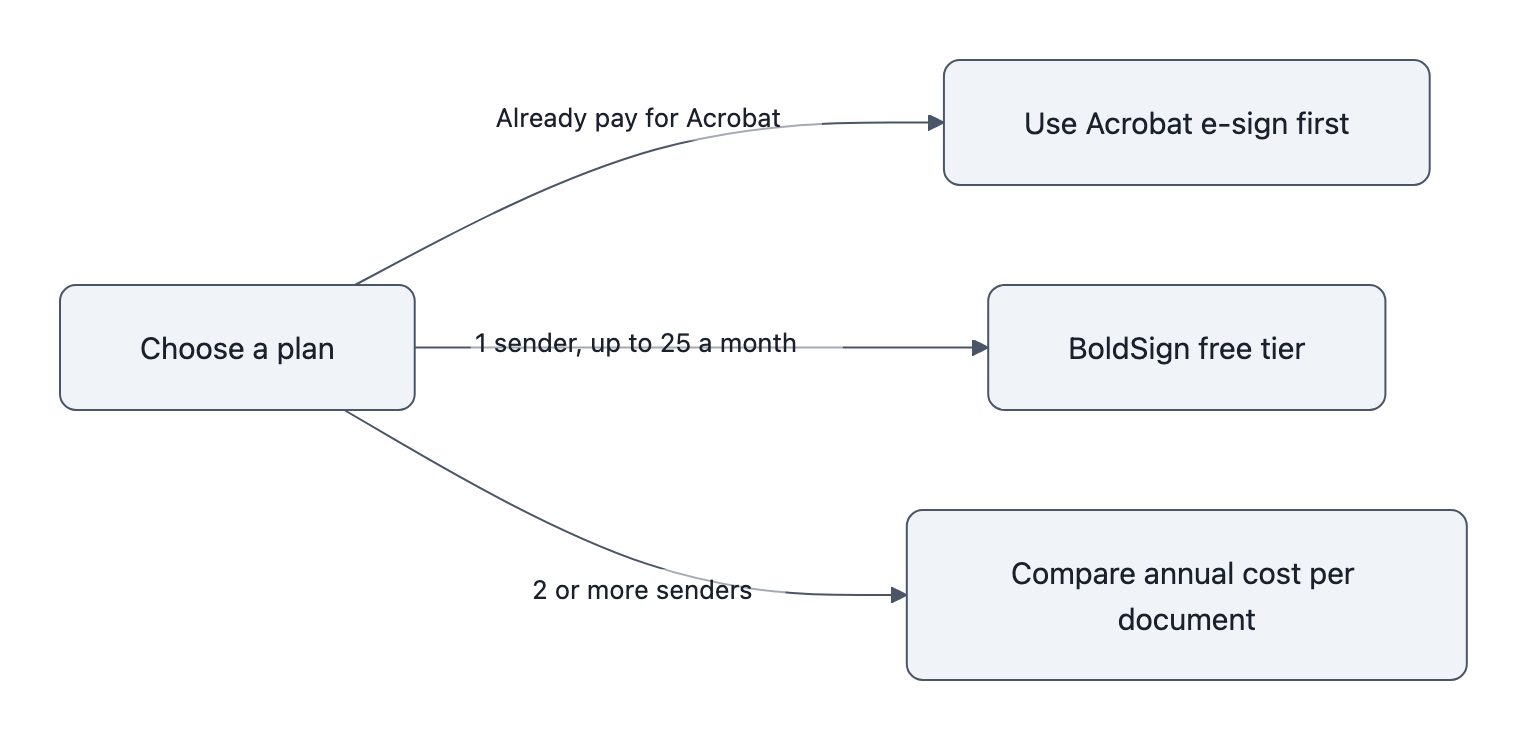
If you already pay for Adobe Acrobat Standard or Pro, check that before you buy anything else. Adobe's transaction-limits help page says these plans include unlimited e-signature sends per user. Large enterprise agreements are the exception. Adobe's separate Acrobat Sign product is capped at 150 sends per user a year.
What e-signature software costs as of 2026
Prices checked November 2026, except DocuSign, which comes from DocuSign's pricing post updated October 2026. All are list prices and are likely to change within a year.
| Plan | Annual billing (per month) | Month-to-month | Sending allowance | Source |
|---|---|---|---|---|
| Dropbox Sign Essentials (1 user) | $15 ($180/yr); $120.60 for the first year on a current offer | $15 | Unlimited | Dropbox Sign, Nov 2026 |
| Dropbox Sign Standard (2 to 5 users) | $17.50 per user | $25 per user | Unlimited | Dropbox Sign, Nov 2026 |
| BoldSign Growth | $5 per user | $15 per user | 50 per user a month | BoldSign, Nov 2026 |
| BoldSign Business | $15 per user | $25 per user | Unlimited | BoldSign, Nov 2026 |
| BoldSign Premium (unlimited users) | $99 flat | $138 flat | 250 a month, then $0.50 each | BoldSign, Nov 2026 |
| Zoho Sign Standard / Professional | Not shown on US page | Not shown on US page | 25 per user a month / unlimited | Zoho, Nov 2026 |
| DocuSign Standard | $25 prepaid; $30 paid monthly | $45 | 100 per user a year | DocuSign, Oct 2026 |
| DocuSign Business Pro | $40 prepaid; $45 paid monthly | $65 | 100 per user a year | DocuSign, Oct 2026 |
| Adobe Acrobat Standard / Pro (individual) | $14.99 / $19.99 | $24.99 / $29.99 | Unlimited, per Adobe's help page | Adobe, Nov 2026 |
Zoho's pricing page listed plan limits but no dollar prices when checked in November 2026, so Zoho's paid plans are left out of the cost comparisons below.
DocuSign charges three prices per plan: one for paying the year upfront, one for a one-year contract paid monthly, and one with no contract. That is why its price looks different from site to site. According to UsagePricing, DocuSign's page began showing the $30 contract price first in May 2026 instead of the $25 prepaid price. The prices themselves didn't change.
What changes the price, and the mistakes that raise it
- Senders, not signers. Count only the staff who send documents. A common mistake is buying seats for people who only sign or approve. Dropbox Sign Standard requires at least 2 users. BoldSign Premium's flat $99 beats BoldSign Business at $15 per user once you have 7 or more senders, as long as you send fewer than 250 documents a month. Above that, Premium charges $0.50 each and Business stays unlimited.
- Envelope caps. DocuSign confirms the 100-per-user-per-year allowance on annual plans, which works out to about 8 a month per seat. Monthly billing gets 10 per user a month. Voided and resent envelopes count too. DocuSign's post lists overage at $3.60 to $7.80 per envelope but doesn't say which plan gets which rate. Get your rate in writing and turn on usage alerts. BoldSign Growth (50 per user a month) and Zoho Sign Standard (25) also cap sends.
- Billing term. Month-to-month costs 43% more on Dropbox Sign Standard ($25 vs $17.50), 67% more on BoldSign Business ($25 vs $15) and Acrobat Standard, 80% more on DocuSign Standard ($45 vs $25 prepaid) and three times as much on BoldSign Growth ($15 vs $5). Annual plans lock you in. Adobe charges a fee of up to half the remaining commitment if you cancel an annual plan after 14 days. Before you sign, get the renewal price and any annual escalator in writing.
- Add-ons. SMS delivery, signer ID verification, bulk send (one document to many signers), payment collection and API access cost extra or require a higher tier. Zoho limits bulk send to its Enterprise plan. Ask for each add-on rate in writing.
Annual cost for a 1-, 3- and 5-sender office, worked out
All figures are list prices on annual billing, checked November 2026. Verify each one before you buy. Cost per document is the annual price divided by the number of documents sent. DocuSign is shown at both its prepaid and its paid-monthly contract price.
Office A: 1 sender, 3 to 5 documents a month. BoldSign's or Zoho's free tier covers this for $0, and so does Acrobat if you already pay for it. Dropbox Sign's 3-a-month free plan is too small. If you outgrow free, BoldSign Growth costs $60 a year, and Dropbox Sign Essentials lists at $180 a year with unlimited signature requests ($120.60 in the first year on a current offer).
Office B: 3 senders, about 20 documents a month (240 a year)
| Option | Annual cost | Cost per document |
|---|---|---|
| BoldSign Growth (150 a month combined) | $180 | $0.75 |
| BoldSign Business | $540 | $2.25 |
| Dropbox Sign Standard | $630 | $2.63 |
| DocuSign Standard (300 included) | $900 to $1,080 | $3.75 to $4.50 |
BoldSign Growth has fewer features than Business. Compare the feature lists before you pick it.
Office C: 5 senders, about 60 documents a month (720 a year)
| Option | Annual cost | Cost per document |
|---|---|---|
| BoldSign Growth (250 a month combined) | $300 | $0.42 |
| BoldSign Business | $900 | $1.25 |
| BoldSign Premium (250 a month) | $1,188 | $1.65 |
| Dropbox Sign Standard | $1,050 | $1.46 |
| DocuSign Standard (500 included) | About $2,300 to $3,500 | About $3.20 to $4.90 |
Office C is where the cap bites. DocuSign's base price is $1,500 to $1,800. Its 500 included envelopes leave 220 as overage, which adds about $790 to $1,720 at DocuSign's published rates.
Compared per document with BoldSign Business, DocuSign costs about 1.7 to 2 times as much at 20 documents a month and 2.5 to 3.9 times as much at 60. Templates and unlimited sending also come with BoldSign Business and Dropbox Sign's paid plans. At small-office volume, the widening gap comes from the envelope meter, not from features.
DocuSign's pricing is built around large customers. Its annual report for the year ended January 31, 2026 counts over 1.8 million customers, 1,205 of which have more than $300,000 in annualized contract value. Digital self-serve sales, the route a small office uses, made up 15% of revenue.
Are e-signatures legally binding? ESIGN, UETA and the documents you can't e-sign

Yes, for most business documents. The federal ESIGN Act, signed June 30, 2000, says a signature, contract or record "may not be denied legal effect, validity, or enforceability solely because it is in electronic form" (15 U.S.C. §7001(a)). That applies equally to a free Zoho account and a DocuSign Business Pro plan.
Every state except New York has adopted the Uniform Electronic Transactions Act (UETA), along with Washington, DC. New York has its own similar law, the Electronic Signatures and Records Act. UETA carries its own exclusions, including wills, codicils and testamentary trusts and most UCC matters, so the list below applies under state law too. The Uniform Law Commission tracks which states have enacted UETA.
If a signature is challenged, evidence decides the outcome. Law firm Mayer Brown's 2021 analysis says that "a party would have to show that a signature is tied to the electronic record through, for example, an audit trail."
Documents ESIGN doesn't cover (15 U.S.C. §7003):
- Wills, codicils and testamentary trusts
- Adoption, divorce and other family-law matters
- Uniform Commercial Code matters other than sales and leases of goods (UCC Articles 2 and 2A), such as checks and other negotiable instruments
- Court orders, notices and official court documents, including briefs and pleadings
- Notices of utility shutoff; default, repossession, foreclosure or eviction on a primary residence; and cancellation of health or life insurance benefits
- Product-recall and safety-failure notices, and documents that must travel with hazardous materials or pesticides
Legally safe at any price: a four-point checklist
- Consumer consent. When the signer is a consumer rather than a business, ESIGN §7001(c) requires their affirmative consent after disclosures. The disclosures cover their right to paper copies and the hardware and software needed to view the records. Check that your tool has a consent step, and turn it on.
- Audit trail. Confirm that every completed document comes with a log of sending, opening and signing. Zoho Sign and BoldSign include one on their free plans. Dropbox Sign says a non-editable audit trail is attached to every signature request.
- Downloadable completed copy. ESIGN §7001(d) accepts electronic records for retention only if they stay accurate and accessible. Save signed PDFs and audit trails to your own storage.
- An excluded-documents list. Keep the list above where staff can see it. Use paper or an attorney for those documents.
This is general information, not legal advice. Several kinds of documents carry extra requirements:
- Real estate recording
- Notarization (remote online notarization rules vary by state)
- Healthcare records
- FDA-regulated records under 21 CFR Part 11
- Lending disclosures
Check with your attorney or state regulator before you e-sign regulated documents.
How to choose: 5 questions to ask before you buy
Above the legal basics, a higher price buys workflow features. These include reusable templates, signing order, bulk send, branding, payment collection and connections to cloud storage, CRM or accounting tools. Decide which ones you'll use weekly, then compare only the plans that include them.
- How many people will send documents now, and how many will in 12 months?
- How many documents go out per month, counting resends and voided ones?
- Does the plan cap envelopes, and what is our overage rate, in writing?
- What will the plan cost at renewal, and is there an annual escalator?
- Which integrations do we need, and which tier includes them?
Before you commit, trial two or three vendors with a real document and a real signer.
FAQ
Does the person signing need an account or have to pay?
No. Signers open the emailed link and sign in a browser or on a phone without creating an account. Only the staff who send documents need a seat.
Do I need DocuSign if I already pay for Adobe Acrobat?
For most small offices, no. Adobe's help page lists unlimited e-signature sends on Acrobat Standard ($14.99 a month, annual) and Pro, and on the teams versions ($16.99 per license for Standard for teams). If Acrobat's templates and workflow meet your needs, a second subscription adds cost without adding legal validity.
Why do sites quote different DocuSign prices for the same plan?
DocuSign charges three prices per plan. Standard is $25 a month prepaid annually, $30 on an annual contract paid monthly, and $45 with no contract. Since May 2026, its pricing page shows the $30 figure first, so newer write-ups quote the higher number.
What happens to my signed documents if I cancel?
That depends on the vendor's account terms, so don't rely on keeping access. Download every completed PDF and its audit trail to your own storage as you go. ESIGN treats electronic records as valid for retention only while they stay accurate and accessible.
Key takeaways
- Count only senders when you price seats. Signers never need one.
- Divide annual cost by documents sent to find your real price per signature.
- Use what you have first: BoldSign's free tier for one sender, or Acrobat if you already pay for it.
- Treat a $0 plan and a $45 plan as equally valid if both pass the four-point legal checklist.
The bottom line
Start by counting your senders and your monthly documents. If you're one sender with two or fewer document types, or you already pay for Acrobat, start there at no extra cost. Otherwise, trial two or three plans with unlimited sending, compare them on annual cost per document, and get overage, renewal and cancellation terms in writing.
Every price here is likely to change within a year. An annual plan locks you in before you see the next one, and Adobe charges up to half the remaining term to leave early.
Sources
- 15 U.S.C. §7001, General rule of validity (ESIGN Act), Cornell Legal Information Institute (statute 2000)
- 15 U.S.C. §7003, Specific exceptions (ESIGN Act), Cornell Legal Information Institute (statute 2000)
- Is Your Electronic Signature Valid? Validity and Other Key Considerations, Mayer Brown (2021)
- Uniform Electronic Transactions Act enactments, Uniform Law Commission (2026)
- DocuSign plans and pricing, DocuSign blog (updated October 2026)
- eSignature plans and pricing, DocuSign (2026)
- DocuSign eSignature price display change, UsagePricing (2026)
- DocuSign Form 10-K, fiscal year ended January 31, 2026, U.S. Securities and Exchange Commission (2026)
- Dropbox Sign pricing, Dropbox (2026)
- Dropbox Sign free plan, Dropbox Help Center (2026)
- Electronic signature pricing, BoldSign (2026)
- Zoho Sign pricing, Zoho (2026)
- Adobe Acrobat pricing for individuals, Adobe (2026)
- Adobe Acrobat for teams pricing, Adobe (2026)
- Acrobat Sign transaction limits, Adobe Help Center (2026)