Project Management Software for Small Teams: Costs Compared
For a 10-person team, project management software with a timeline or time tracking costs about $1,000 to $3,000 a year at list price. Where you land depends on which feature you need. ClickUp Core is the cheapest way to get both a timeline and built-in time tracking, at about $1,080 a year for 10 people, while Asana charges nearly three times that for its time tracking. If you already pay for Microsoft 365, try the basic Planner that comes with it before you buy anything.
At a glance
| If you need... | Likely bill for 10 users, per year | Source, year |
|---|---|---|
| Simple boards only | About $600 (Trello Standard) | Trello, 2026 |
| A timeline (Gantt) view | About $1,080 to $1,440 | Vendor pricing pages, 2026 |
| Built-in time tracking | About $1,080 (ClickUp) to $2,999 (Asana) | Vendor pricing pages, 2026 |
| One flat price, up to 15 users | About $1,188 (Basecamp Pro Plus) | Basecamp, 2026 |
| Monthly instead of annual billing | 23% to 33% more per seat | Asana, Trello, ClickUp, 2026 |
All prices are as of November 2026, billed annually unless noted. Expect most of them to change within a year, so confirm each one on the vendor's pricing page before you buy.
Boards, lists, timelines and time tracking: what you're actually buying
Every tool here handles tasks with owners and due dates. Plans differ on four features:
- Boards: cards you drag across columns from "To do" to "Done" (kanban). Every free plan has them.
- Timeline (Gantt) view: a bar chart of tasks on a calendar that shows which task must finish before the next starts.
- Built-in time tracking: a timer on each task, with hours you can report on. This feature varies the most in price.
- Automations: rules such as "when a card moves to Done, notify the client lead," capped per month.
Which kind of team fits which tool
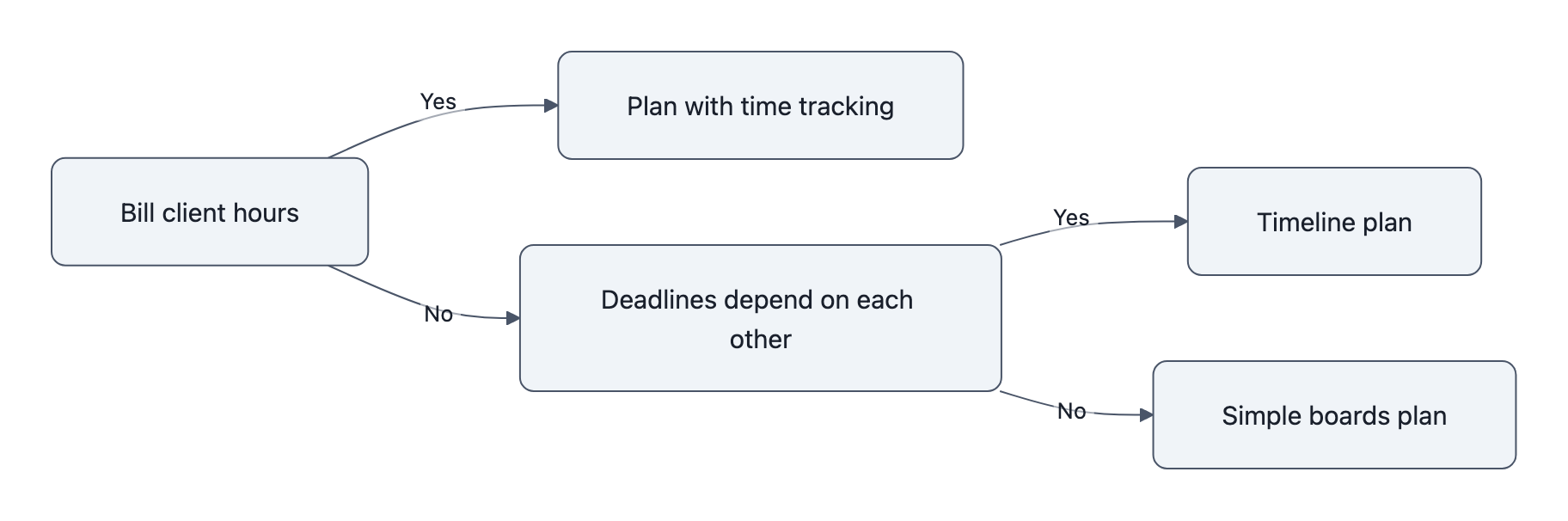
- Client-services teams that bill hours: agencies, consultants and design firms need time tracking. That points to ClickUp Core, monday.com Pro or Asana Advanced.
- Teams that run lots of small tasks: office admin, support queues and content calendars do fine with boards. Trello Standard at $5 per user, or a free plan, covers this.
- Teams with linked deadlines: event planners, fit-out projects and product launches need a timeline. Asana Starter, monday.com Standard, Trello Premium, ClickUp Core and Planner Plan 1 all include one.
- Teams already on Microsoft 365: start with the basic Planner you already pay for, and upgrade only when you hit a missing feature.
- Teams that want one predictable bill: Basecamp charges a flat monthly rate instead of charging per person.
Price the feature you need: the real annual cost for 5, 10 and 20 people
Most roundups compare entry prices. Your bill depends on the cheapest tier that unlocks the feature you can't do without. Where a tool has two cost figures, the first is its cheapest timeline plan and the second its cheapest time-tracking plan.
| Tool | Cheapest plan with timeline | Cheapest plan with built-in time tracking | 5 users/yr | 10 users/yr | 20 users/yr |
|---|---|---|---|---|---|
| Asana | Starter, $10.99 | Advanced, $24.99 | $659 / $1,499 | $1,319 / $2,999 | $2,638 / $5,998 |
| monday.com | Standard, $12 | Pro, $19 | $720 / $1,140 | $1,440 / $2,280 | $2,880 / $4,560 |
| ClickUp | Core, $9 | Core, $9 | $540 | $1,080 | $2,160 |
| Trello | Premium, $10 | None on pricing page | $600 | $1,200 | $2,400 |
| Microsoft Planner | Plan 1, $10 | None in any tier | $600 | $1,200 | $2,400 |
Prices are per user per month, billed annually, as of November 2026. Annual figures are list-price estimates (price × seats × 12) and leave out sales tax, add-ons and discounts. The Planner Plan 1 price is from Microsoft's Planner plans page, paid yearly.
Basecamp sits outside this table because it charges a flat monthly rate and its pricing page lists neither a timeline nor time tracking as a tier feature. Its tiers differ by users, active projects and storage:
- Freelancer: $29/month ($348 a year) for 5 users, 3 projects and 10GB.
- Pro: $79/month ($948 a year) for up to 10 users, 8 projects and 25GB.
- Pro Plus: $99/month (about $1,188 a year) for up to 15 users, 12 projects and 100GB.
- Pro Unlimited: $199/month billed annually ($2,388 a year), or $329 billed monthly, for unlimited users and projects and 1TB.
What the numbers mean for you:
- Asana: the timeline is cheap, but time tracking is on Advanced only. A 10-person team that bills hours pays about $1,680 more a year than one that only needs a timeline.
- monday.com: Pro adds time tracking and raises the automation cap from 250 to 25,000 runs a month. For busy teams, the automation cap matters as much as time tracking.
- ClickUp: Core includes both features. Business ($17) adds advanced time tracking.
- Trello: Premium unlocks Timeline, Calendar, Table and Dashboard views. The pricing page lists no built-in time tracking on any plan.
- Microsoft Planner: Plan 1 adds timeline view and dependencies on top of your Microsoft 365 bill. ppm.express reports that timesheets do not appear in any Planner tier.
- Basecamp: the per-person cost drops as you fill the tier, so a 12-person team pays the same as a 15-person team. The real limit is active projects: a busy agency that runs more than 12 at once needs Pro Unlimited, about twice ClickUp Core for 10 people.
What changes the price: seat minimums, billing terms, feature gates and AI credits
Seat bundles. monday.com sells seats in set bundles, not one at a time. A November 2026 analysis by SaaS CRM Review quotes monday.com's support article: plans "start at 3 seats, then multiples of 5." monday.com's own support page did not load to confirm this. If it holds, a 6-person team on Standard buys 10 seats and pays $1,440 a year instead of $864. Check the seat picker before you commit.
Billing terms. Monthly billing costs more per seat:
| Plan | Annual billing | Monthly billing | Extra cost of monthly |
|---|---|---|---|
| Asana Starter | $10.99 | $13.49 | 23% |
| Trello Premium | $10 | $12.50 | 25% |
| ClickUp Core | $9 | $12 | 33% |
| monday.com | Advertises "save 18%" on annual | Not confirmed | About 18% |
For 10 users on Asana Starter, the gap is about $300 a year. The trade-off is that annual billing locks you in for 12 months.
Feature gates. These are features held back for higher tiers. Beyond timeline and time tracking, automations are the main gate: Trello Free allows 250 runs a month, ClickUp Free 100 automation actions, and monday.com Standard 250.
AI credits. Asana, monday.com and ClickUp each list AI credit allowances by tier, and these are the least stable numbers on any pricing page. ClickUp sells extra credits at $10 per 10,000. Microsoft 365 Copilot is a separate $30 per user per month paid yearly, according to Microsoft, which brings Planner Plan 1 with Copilot to $40.
Free plans: what you get before you pay
| Tool | User cap | Other limits | What's missing |
|---|---|---|---|
| Asana Personal | 2 users | Timeline, time tracking | |
| monday.com Free | 2 seats | 3 boards | Gantt, time tracking |
| Trello Free | 10 collaborators per workspace | 10 boards, 250 automation runs/month | Timeline, Calendar, Table views |
| ClickUp Free | Unlimited members | 60MB storage, 100 automation actions/month | Gantt (trial only), time tracking |
| Basecamp Free | 3 users | 1 project, 1GB | More projects and users |
Source: vendor pricing pages, November 2026.
Free plans work for 2 or 3 people, or as a trial. Trello Free is the most usable for a whole small office because it allows 10 collaborators. ClickUp Free allows unlimited people, but 60MB of storage fills quickly once people attach files.
Older articles describe more generous free plans: 15 free users on Asana, unlimited members on Trello and 100MB on ClickUp. The same goes for plan names, such as ClickUp "Unlimited $7" or a Basecamp "$15 per user" plan. All of these vendor pages now show the limits and plans above.
How to choose: questions to ask before you buy
Shortlist two or three tools and run each free trial on a real project, not a demo. For 20 or more seats, ask for a written quote. Then put these questions to each vendor, or check their help pages:
- Which plan is the cheapest one that includes the single feature we can't work without?
- Do you sell seats one at a time or in bundles, and what is the smallest bundle that covers our headcount?
- What does this plan cost billed monthly, and can we cancel or downgrade an annual plan mid-term?
- How many automation runs and AI credits are included, and what happens when we hit the cap?
- Can an admin require multi-factor authentication (MFA, a code or app prompt on top of the password) for every user?
- Can an admin remove a departing employee and reassign their tasks in one step?
- Can we export all tasks, comments and files in a standard format such as CSV?
- Is single sign-on (SSO, logging in through your Google or Microsoft account) included on our plan, or only on enterprise tiers?
On question 5, CISA (the federal Cybersecurity and Infrastructure Security Agency) advises turning on MFA for every account and says "any MFA is better than no MFA." On question 8, several vendors keep SSO for top tiers. This guide did not check it plan by plan, so get the answer in writing.
Red flags and common mistakes
- Paying for seats nobody uses: count the people who update tasks every week. People who check status once a month don't need a full paid seat, so ask about guest or viewer access.
- Surprises after the trial: trials that run on a top tier hide which features you lose when you drop to the plan you can afford. ClickUp Free, for example, offers Gantt as a trial only.
- Hitting the AI credit cap: if AI summaries become part of daily work, running out mid-month either adds a charge or switches the feature off.
Rolling it out without losing your team
The biggest risk is staff pushback, not a missing feature. In a GetApp survey of 1,011 UK managers, decision-makers and small-business owners, run in January 2021, 55% said employees opposed adopting project management software. The most common objection, from 25% of respondents, was that it would mean extra work; 14% saw no value and 11% didn't want to learn a new tool. That is 2021 UK data, not a current US figure, but it points to one design goal: make the tool less work than what it replaces.
- Name one owner. One person sets up projects, answers questions and decides conventions.
- Pilot one live project. Use 3 to 5 people, monthly billing and a real deadline. Don't sign an annual contract for a workspace nobody has adopted.
- Set three rules up front: what counts as a task, who sets due dates, and that project updates go in the tool, not email.
- Build one template for your most common job, such as client onboarding or the monthly close.
- Move only open work. Leave finished projects in the old system as an archive.
- Set a retirement date for the old spreadsheet or tool. When both stay open, people update whichever is easier, and neither is right.
- Review after 30 days. Cut unused seats, confirm you need the paid feature, then move to annual billing.
FAQ
Is flat-rate or per-user pricing cheaper?
At most small-team sizes, Basecamp's flat rate is cheaper, as long as you stay under its project caps. At 5 users, Basecamp Freelancer ($348 a year) undercuts every per-user plan in the table, but allows only 3 active projects. At 10 users, Basecamp Pro ($948) costs $132 less than ClickUp Core ($1,080), and at 15 users Pro Plus (about $1,188) beats every per-user timeline plan. Per-user tools win once you need more projects, a timeline or built-in time tracking.
Can we add a time-tracking app instead of upgrading?

Yes, but it doesn't save money against ClickUp. Trello Premium ($10) plus Harvest Teams ($9 per seat) comes to about $19 per user, or roughly $2,280 a year for 10 people, at list prices as of November 2026. ClickUp Core includes both for $1,080. The add-on route makes sense if your team already uses Harvest or prefers Trello's boards.
We already pay for Microsoft 365. Do we need to buy anything?
For boards and task lists, no: basic Planner comes with Microsoft 365. Planner Plan 1, at $10 per user per month paid yearly, adds timeline view and dependencies. No Planner tier includes timesheets, so a team that bills hours needs a separate tool either way.
Do these tools actually pay off once adopted?
The same 2021 GetApp survey found 79% of users said the tools helped them meet goals. It also found 36% said their current tool didn't fully meet their needs and they had to work around it. That second figure is the case for pricing the feature you need before you buy, rather than the cheapest plan.
Key takeaways
- Pick the feature first: decide whether you need a timeline, time tracking or neither, then find the cheapest tier that includes it.
- Check seat rules and project caps: monday.com sells seat bundles and Basecamp caps active projects, and both change the real bill.
- Pilot on monthly billing: run one real project for 30 days before committing to 12 months.
- Turn on MFA and test export during the trial: both are harder to fix after your work has moved in.
The bottom line
Write down the one feature you can't work without and your real headcount, use the table to find your likely bill on two or three tools, and confirm each price on the vendor's page. Pilot the front-runner with monthly billing before you switch to annual. Then recheck tier gates and AI credit caps at every renewal, not just at purchase: AI allowances are the least stable numbers on these pages, and ClickUp's plan names have already changed once.
Sources
- Asana Pricing, Asana, 2026
- Trello Pricing, Atlassian (Trello), 2026
- monday.com Work Management Pricing, monday.com, 2026
- ClickUp Pricing, ClickUp, 2026
- Basecamp Pricing, 37signals (Basecamp), 2026
- Microsoft Planner plans and pricing, Microsoft, 2026
- Microsoft 365 Copilot pricing, Microsoft, 2026
- Microsoft Planner Licensing & Pricing, ppm.express, 2026
- The SaaS Seat Tax, SaaS CRM Review, 2026 (quoting monday.com's seat-bundle support article)
- Harvest Pricing, Harvest, 2026
- More than a Password: Multifactor Authentication, Cybersecurity and Infrastructure Security Agency
- Project management tools help businesses meet objectives, GetApp UK, 2021 (original survey)
- Struggling to implement PM software?, Rebel's Guide to Project Management, 2021 (summary of GetApp survey)